Why SEOs Should Care About the Accessibility Tree for the Agentic Future

For decades, technical SEO has rightfully focused heavily on the Document Object Model (DOM). We obsess over rendering times, DOM depth, and injecting schema markup so that traditional crawlers like Googlebot can extract our content and rank our pages. But as of June 2026, we are moving away from traditional search engines that simply retrieve information toward autonomous web agents that can navigate, filter, and take action on the web on behalf of a user. To prepare for this agentic future, SEOs need to understand a key distinction: Googlebot renders your page with a headless Chromium instance and indexes the resulting DOM, but AI agents read a webpage differently. Instead of parsing the rendered DOM, they rely on a hidden layer of the web: the Accessibility (AX) Tree.
Table of Contents
What is the Accessibility (AX) Tree?
The Accessibility Tree (AX Tree) is a specialized, semantic subset of the DOM. When a browser loads a webpage, it first parses the HTML into the DOM to construct the page structure. Subsequently, the browser's accessibility engine translates that DOM into the AX Tree.
Originally designed entirely for assistive technologies like screen readers (e.g., VoiceOver, NVDA), the AX
Tree intentionally strips away visual-only elements. It ignores decorative <div>
tags, layout tables, and CSS background images, leaving behind a pure, semantic, and highly machine-readable
map of the page's content and user interface.
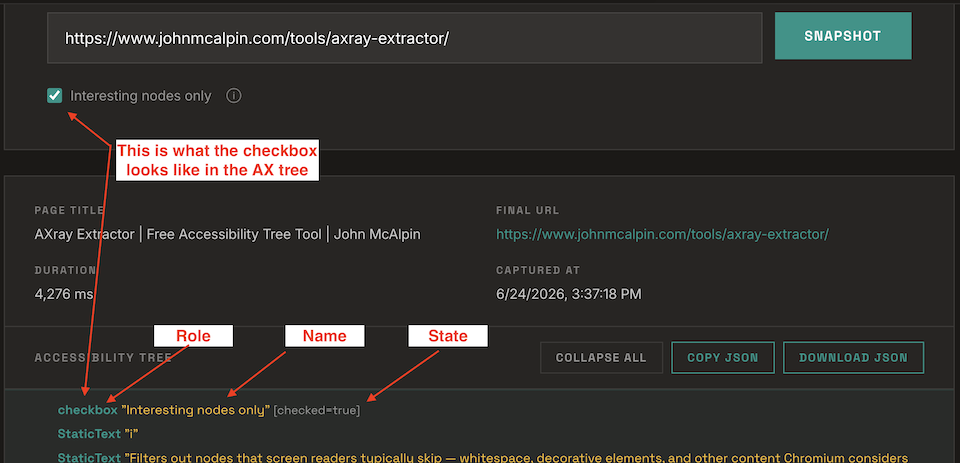
For every node it retains, the AX Tree exposes four primary pieces of data to the machine:
Core Elements of the Accessibility Tree
- Role: What is the nature of this element? (e.g., heading, link, button, navigation, article)
- Name: How should this element be identified? (e.g., anchor text inside a link or an aria-label)
- Value: What data does this element hold? (e.g., an input's typed text, a slider's position)
- State: What is the current operational condition? (e.g., checked, expanded, hidden)
The token economics of web agents
You might wonder: if modern AI vision models are so advanced, why don't agents just look at the screen like humans do?
The answer comes down to computational economics, token limits, and efficiency of semantic structures. There are three primary approaches an AI agent can use to perceive a webpage, each sitting at a different point on the cost-versus-signal spectrum:
Vision-based (screenshots): Best for Design Validation
The agent takes a screenshot, analyzes the pixels to find a button, executes a click, and takes another screenshot. This is incredibly computationally expensive. A single screenshot can cost roughly 50,000 tokens to process.
Raw DOM parsing (HTML source): Best for Initial Analysis
The agent fetches the raw HTML source and parses it directly, walking through all tags, attributes, and text content. This is less expensive than vision processing (a measured content page runs roughly 8,000 tokens) but raw HTML is inherently noisy. It includes presentational markup, script blocks, inline styles, and decorative elements that carry no semantic meaning. The agent must do significant filtering work itself to determine what is actionable, which introduces more room for error than a purpose-built semantic structure.
AX Tree-based (semantic structure): Best for Agentic Auditing
The agent walks the DOM, extracts the AX Tree, maps the interactive elements, and reasons over that structured data. Token cost varies significantly depending on page length and DOM complexity. A filtered AX Tree (semantically meaningful nodes only) can run around 15,000 tokens on a content-heavy page, while a full unfiltered export can exceed 100,000. Crucially, the browser's accessibility engine has already done the filtering work: decorative elements are stripped, roles are explicit, and every node carries a clear semantic purpose.
Some agents also use hybrid approaches, combining two or more of these methods: using vision to validate a UI state after an AX Tree-driven interaction, or falling back to raw DOM when accessibility information is sparse.
| Method | Approx. tokens per page | Speed | Reliability |
|---|---|---|---|
| Screenshot (vision) | ~50,000 | Slow | 40%: limited to above-fold; misses page depth |
| DOM Parse (web fetch) | ~8,000 | Fast | High on static pages; poor on JS-rendered pages |
| AX Tree (filtered) | ~15,300 | Fast | 90%: structured, semantic; fits all model contexts |
| AX Tree (full) | ~124,500 | Fast | 100%: complete; may exceed model context limits |
| Markdown | ~5,800 | Fast | High for content; misses UI elements and interactive states |
When an AI agent is executing a 20-step workflow across multiple websites, parsing the AX Tree provides massive speed, cost, and reliability advantages over vision alone. This is why leading developer tools for agents, such as Microsoft's Playwright MCP (Model Context Protocol), lean heavily on accessibility trees to interact with the web.
It's worth noting that if you're looking for token optimization, markdown files are still the champion when it comes to delivering content at minimal token costs. AX Tree wins for interactive page traversal; clean markdown wins for pure content delivery.

Reliability scored via a 5-task battery (topic identification, interactive element detection, heading hierarchy extraction, external URL identification, primary CTA detection). Agent compatibility scored 1–5 across setup friction, automation potential, and cross-model support, then averaged. Token counts estimated using a character/word hybrid method against johnmcalpin.com/seo-data-study-how-often-google-changes-title-tags-and-why/ on June 23, 2026, using Claude Sonnet 4 (input pricing: $3.00/1M tokens). Cost per page = est. tokens × $0.000003.
How Google is pushing the "agentic web"
Google is actively encouraging webmasters to prepare for AI agents. Google Lighthouse recently introduced a brand new Agentic Browsing category to its reporting suite.
Rather than just checking Core Web Vitals, this new category runs audits specifically to see how efficiently AI agents can interact with your website. One of the primary pass/fail metrics in this new Lighthouse report? "Accessibility tree is not well-formed."
Worth being precise here: this is an agent-readiness signal, not a ranking one. Beyond Core Web Vitals, other page experience aspects don't directly help your website rank higher in search results, and that includes accessibility tree structure. Fixing your AX tree earns you agent compatibility, not a search visibility boost.
5 SEO use cases for AX Tree optimization
To future-proof your site, you must view it exactly as a highly literal machine sees it. Here are five ways SEOs can leverage AX Tree optimization for the agentic web.
1. Ensuring actionability for agentic RAG
In Agentic RAG (Retrieval-Augmented Generation), an AI doesn't just read an article. It might need to interact with dynamic filters, bypass cookie pop-ups, or navigate a faceted menu to retrieve the correct data.
If your
interactive elements are built with generic <div>
tags instead of semantic HTML5 elements like <button>
or <select>,
the agent will not recognize them as interactive roles in the AX Tree, and the automated workflow will fail.
2. Auditing dynamic UI states and hidden content
While traditional SEOs might just disable JavaScript to test basic server-side rendering, that method doesn't help you evaluate interactive, dynamic DOM changes. Modern AI agents frequently need to interact with complex UI elements like accordion menus, tabs, multi-step forms, and modal pop-ups.
By extracting the
AX Tree, you can verify exactly what interactive state is being communicated to the agent. Are your hidden
tabs correctly exposing their expanded
or collapsed
state via ARIA attributes? If a crucial piece of content is hidden behind a "Read More" trigger that lacks
the proper semantic role, an agent won't know it can interact with it to reveal the rest of the text.
3. Uncovering crawlability traps (fake links)
Developers
occasionally build navigation elements using <div onclick="...">
rather than an actual <a>
tag with an href attribute. In the AX Tree, this reveals itself as generic text rather than a "role": "link".
Because traditional crawlers like Googlebot and modern web agents primarily traverse the web via explicit
href paths, spotting this discrepancy in the AX Tree instantly alerts you to a severe crawlability
roadblock.
If you want help quickly finding JS links on your website, check out this link highlighting Chrome extension I made. It highlights all links on your website and separates href links from JS links by color.
4. Validating semantic hierarchy and boilerplate separation
The AX
Tree allows you to strip away visual CSS noise and objectively evaluate your structural hierarchy. Does your
page explicitly separate "role": "navigation"
from "role": "main"?
Are your headings sequentially logical without skipping levels (e.g., level 1 followed by level 2)? If your AX Tree resembles a disorganized list of generic nodes, AI parsers will struggle to separate your core entity data from surrounding site noise.
← no landmark context: disorganized blob
5. Reverse-engineering competitor AI visibility
When a competitor consistently secures Featured Snippets, AI Overviews, or LLM citations for high-value queries, you can run their URL through an AX extractor.
Instead of attempting to parse their complex visual design, analyze their pure semantic architecture. How are their lists labeled? What roles did they assign to their specific UI elements? This reverse-engineering enables you to replicate highly successful, machine-readable structures on your own assets.
- Use semantic HTML5 elements for all interactive components (
<button>,<nav>,<main>,<article>) so agents can identify roles without guessing. - Add ARIA attributes to dynamic content (modals, accordions, tabs) to expose state changes agents rely on to trigger interactions.
- Audit for div-based links and buttons that block crawlers and agents from traversing your site.
- Maintain a logical heading hierarchy (no skipped levels) to help agents separate primary content from navigation boilerplate.
- Run a Lighthouse Agentic Browsing audit to check whether Google itself can efficiently interact with your pages.
The future of SEO lies beyond keywords and backlinks; it hinges on actionability. As the web becomes increasingly populated by autonomous AI agents, ensuring your site has a pristine, logical Accessibility Tree is a foundational requirement for agent interaction in the AI era.
AI Disclosure: The content on this page was written by myself, John McAlpin. However, some of the design elements were created with the assistance of AI.