Are Hackers Google Dorking ChatGPT?

I've been monitoring URL hallucination hits in my server logs for some time now. URL hallucination hits are 404s from AI bots requesting pages that don't exist on my site. Most days it's a quiet trickle.
Then every now and then, I get a spike like this one.
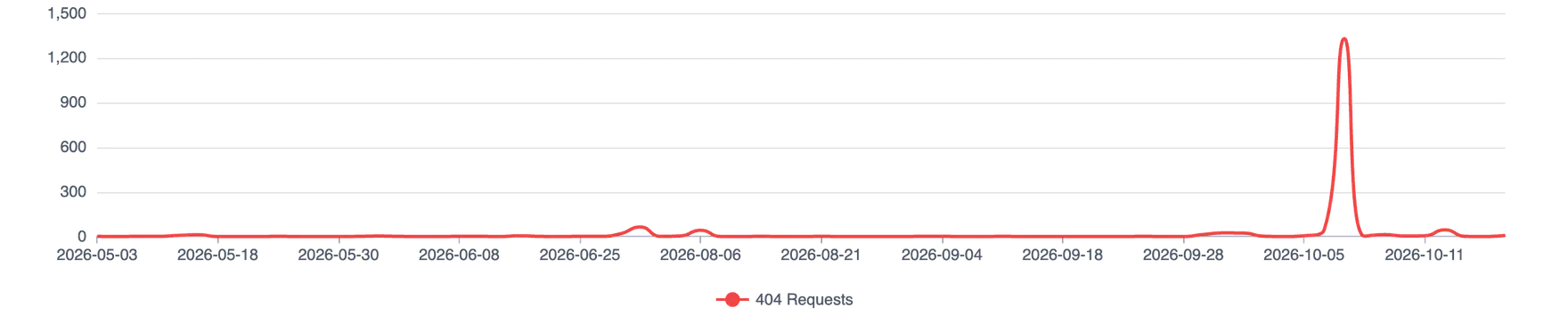
Table of Contents
So, who is responsible for that spike?
Overwhelmingly, OAI-SearchBot.
OAI-SearchBot is the crawler OpenAI uses to surface websites in ChatGPT's search features. It's not the bot that trains OpenAI's models (that's GPTBot), and it's not the one that fetches a page when a user asks ChatGPT to look something up (that's ChatGPT-User). OpenAI breaks down all three in its crawler documentation.
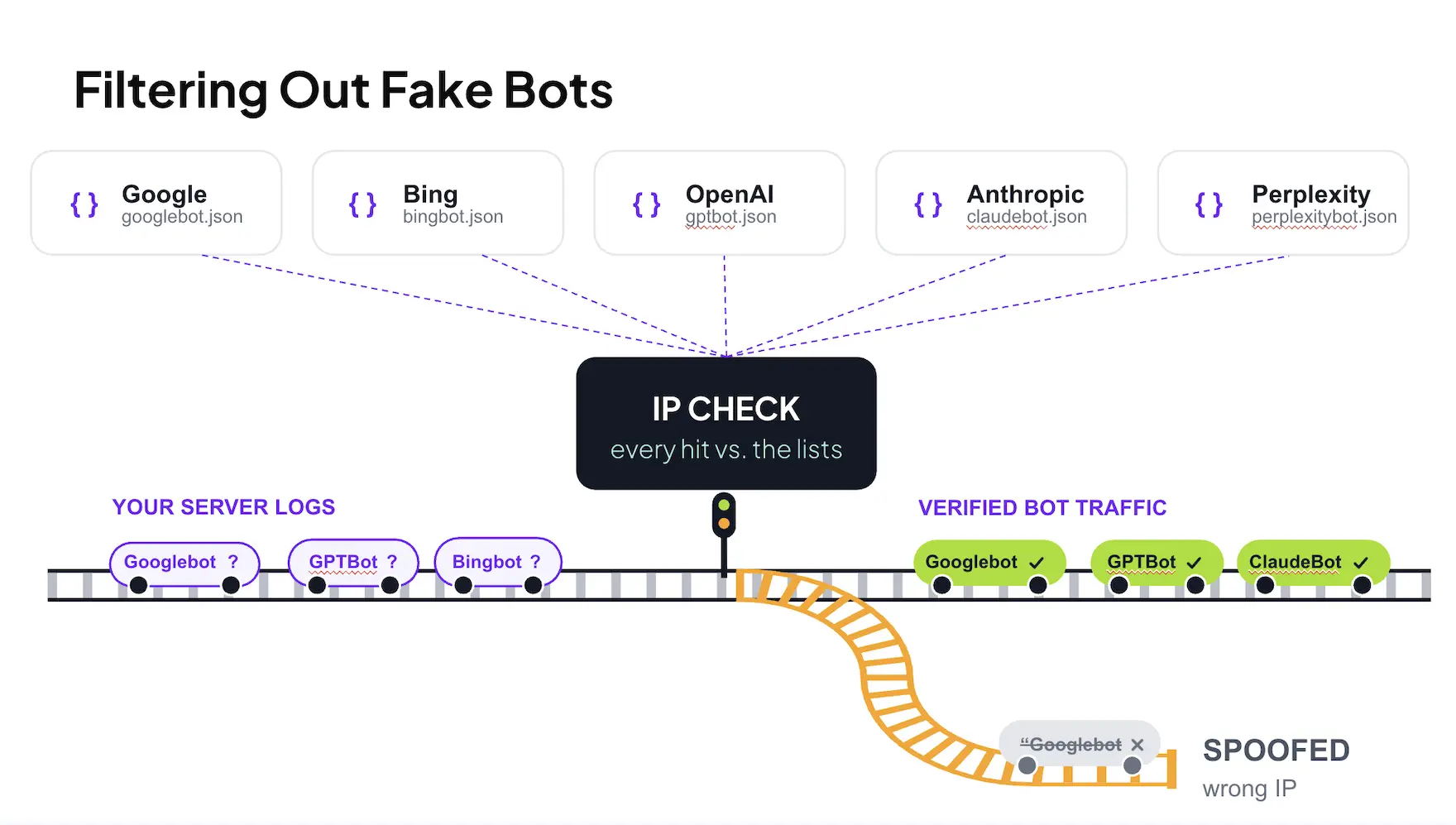
Before going any further, the obvious question: is it really OpenAI? User agents are easy to fake, and plenty of scanners pretend to be AI crawlers to slip past firewalls that allow them.
That's why my dashboard only counts bots whose source IPs match the ranges each AI company publishes. Everything in the chart above passed that check. This was the real OAI-SearchBot.
I actually spoke at the Brighton SEO conference this past week in the UK about my exact methodology for filtering out spoofed bots.
The raw logs tell a slightly bigger story, though. On October 7, 1,766 requests claimed to be OAI-SearchBot. 1,737 came from OpenAI's published IP ranges.
The other 29 came from Google Cloud IPs (specifically cloud-hosted scraping scripts) wearing an OAI-SearchBot
costume, so my dashboard filtered them out. And they went straight for the good stuff: .env
files, AWS credentials and /.git/HEAD.
So yes, spoofing is real. It just wasn't behind this spike.
The evidence of hacking attempts
Here's where it gets weird. Looking at the exact paths requested, there's a clear pattern:
- Login pages
- Admin panels
- Server internals.
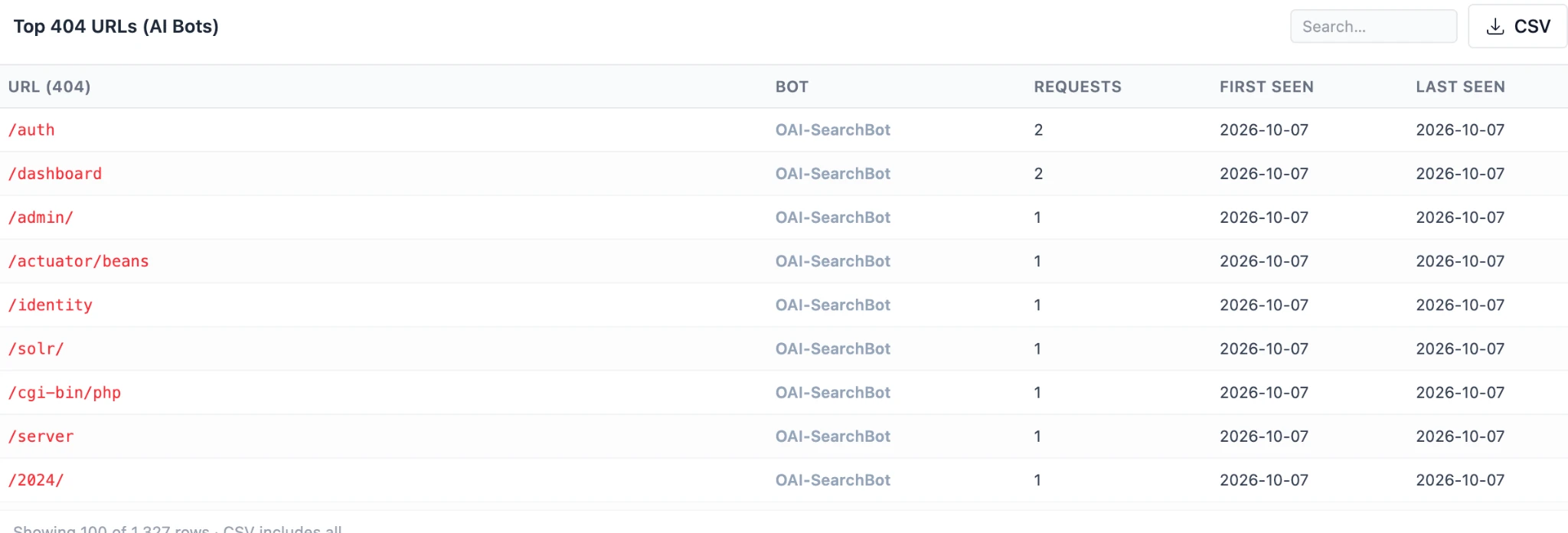
Notice the request counts. One or two hits per path, spread across a huge number of paths.
That's the same pattern security experts see in early stage reconnaissance. Hit as many common endpoints as possible and see which ones come back with a 200.
I pulled the full day of logs to see what else it asked for. Leaving out robots.txt, the
verified OAI-SearchBot requests hit 1,668 unique paths in about 15 hours, across both my main site and my API
subdomain. Only 54 of those paths were requested more than once.
Here's how they break down.
| Category | Unique paths | Requests | Example paths |
|---|---|---|---|
| Unknown PHP scripts (likely web shells) | 257 | 306 | /gecko.php, /gptsh.php, /shellalfa.php |
| DevOps, databases and monitoring | 215 | 215 | /jenkins/script, /grafana/api/dashboards, /redis-commander |
| Config and framework internals | 143 | 144 | /app/etc/env.php, /config/database, /storage/logs |
| Admin panels and CMS logins | 128 | 131 | /admin/, /administrator, /cpanel, /pma |
| Authentication, SSO and sessions | 117 | 118 | /auth, /oauth/token, /saml/acs, /reset_password |
| Debug, profiler and test output | 82 | 82 | /debug/pprof/heap, /telescope/queries, /rails/info/routes |
| Server status, logs and CGI | 76 | 76 | /cgi-bin/php, /cgi-bin/bash, /nginx_status, /error_log |
| Spring Boot and Java management | 71 | 71 | /actuator/beans, /actuator/shutdown, /jolokia/exec |
| API docs and endpoints | 70 | 70 | /swagger-ui.html, /graphiql, /_api/web/currentuser |
| Payments, billing and webhooks | 62 | 62 | /stripe/webhook, /payment/callback, /webhooks/shopify |
| File managers and upload scripts | 53 | 53 | /tinymce/plugins/filemanager/dialog.php, /jquery-file-upload/server/php/ |
| Webmail and mail servers | 25 | 25 | /roundcube, /owa, /zimbra, /webmail |
| Secrets and credential files | 15 | 15 | /aws-credentials, /authorized_keys, /jwt-secret, /private-key |
| Generic app routes (low signal) | 354 | 354 | /about-us, /careers, /orders, /settings |
| Total | 1,668 | 1,722 |
Strip out the generic app routes, and roughly four out of five requests were aimed at something an attacker would actually want.
Luckily, my website is a small portfolio site with no login and no sensitive data stored online. But that doesn't stop anyone from checking.
To me, this looks like old school Google dorking. With a twist.
What's Google dorking?
Google dorking is the practice of using advanced search operators to find publicly exposed attack vectors that have already been discovered and indexed by Google.
For example, let's say you wanted to find university websites that run WordPress. You could go to Google and search for:
site:.edu inurl:/wp-admin/
And get results like this:
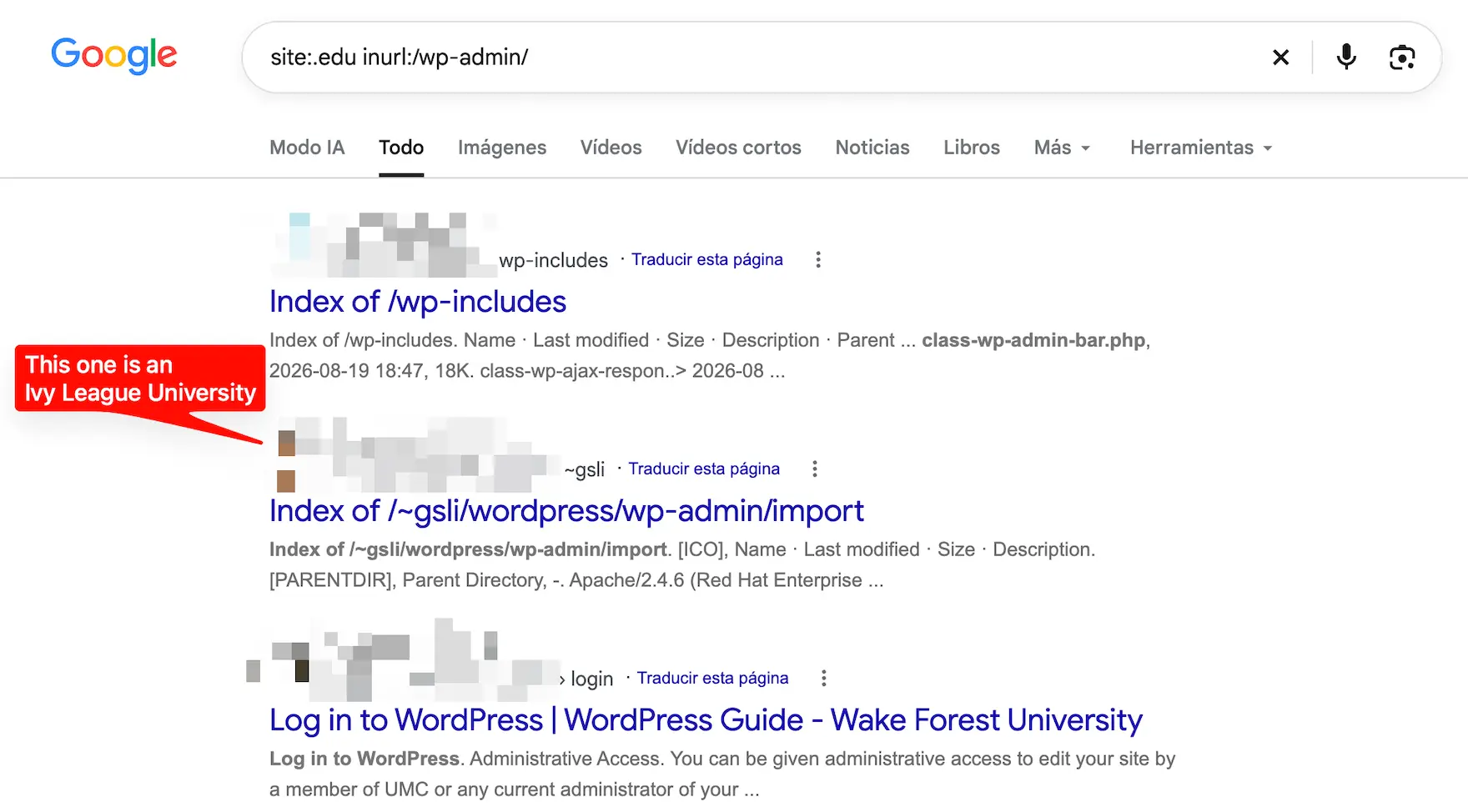
From there, an attacker has a ready made list of websites to scan for WordPress vulnerabilities. Google did the crawling for them.
Now for the twist. Dorking queries an index. It never touches your server.
What showed up in my logs is the step before that: a crawler requesting common attack paths, one site at a
time. If an AI search index ends up knowing which sites return a 200 for /actuator/beans, that's a
dorking dataset waiting to be queried.
How this could work with ChatGPT
I can't prove the mechanism, due to the lack of access to all of the origin data. But there are a few plausible explanations.
- Someone is feeding the URLs in. OAI-SearchBot crawls URLs it discovers, and discovery isn't limited to links on your own site. Get a list of probe paths into ChatGPT search's discovery pipeline, and OpenAI's own crawler does the scanning for you.
- Someone is driving it through the API. Most of the big AI companies have guardrails that stop their consumer apps from doing anything obviously malicious. Pair the API with a locally hosted LLM, though, and those guardrails get a lot thinner. The catch: I'd expect those requests to show up as ChatGPT-User, not OAI-SearchBot. That makes me lean toward the first explanation.
- The bot is following links that shouldn't be links. Scanner wordlists live publicly on
GitHub, and some sites publish raw logs or stats pages packed with probe paths. A crawler that finds
/.ssh/id_rsawritten on a public page might just try it. None of these paths are linked anywhere on my site, but that doesn't rule out external pages pointing to them.
Why use ChatGPT?
If this is deliberate, it's an expensive way to test for attack vectors. There are faster, free tools built for exactly this job.
My guess is that either:
- They want to evade IP blocking. A verified OpenAI IP gets waved through by a lot of firewalls that block everything else.
- They're not programmers and are vibe coding their way into websites.
I'm not ruling out the second one.
Is this common on other websites?
Yes. I've seen this pattern across a wide range of client websites, not just my portfolio.
Training bots are doing it too
What's interesting is that it isn't just OAI-SearchBot. I'm seeing the same pattern from other AI crawlers too (ClaudeBot, PerplexityBot and GPTBot).
Same IP verification. Same result. They're the real bots, on both my small portfolio website and enterprise client websites.
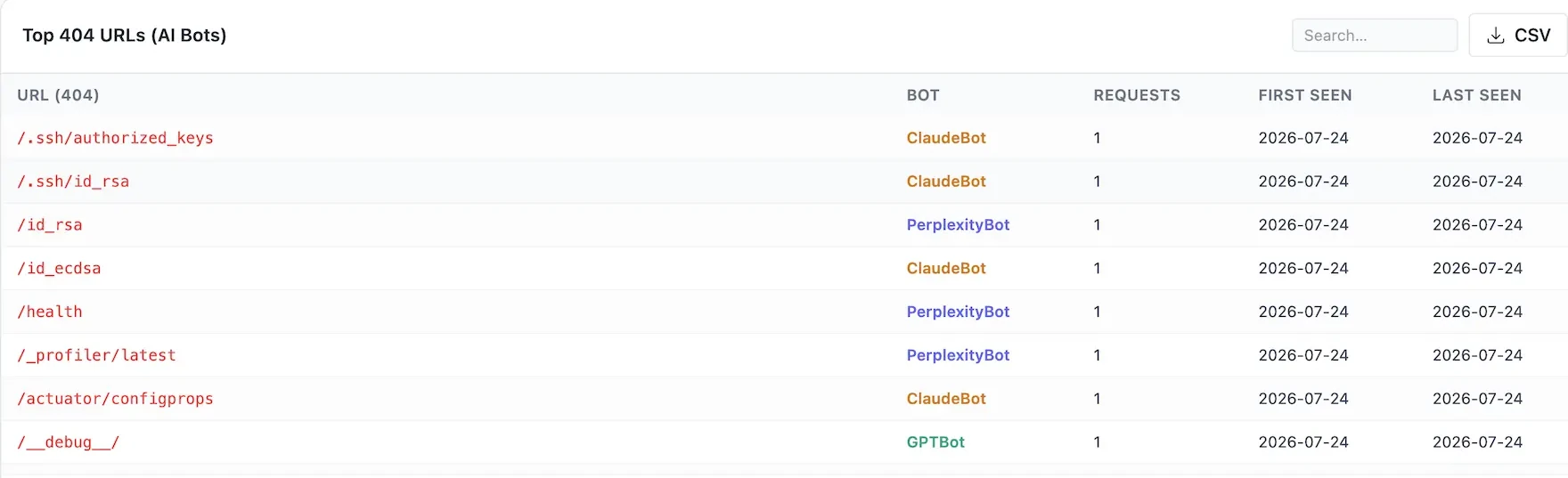
These aren't pages anyone hallucinates from a sitemap. They're straight off a scanner wordlist.
Most telling? Every one of those requests landed on the same day, from three different AI companies.
That's concerning, especially since internal links to these pages don't exist.
So, are hackers Google dorking ChatGPT?
I can't prove intent. Nobody outside OpenAI, Anthropic or Perplexity can see why their crawlers requested these URLs.
What I can prove is that verified AI crawlers are requesting the same paths vulnerability scanners do. Whether someone is steering them or they're crawling wordlists they found in the wild, the outcome is the same. Your attack surface could end up in an AI index.
What to do about it
- Verify before you allowlist. Don't trust a user agent on its own. Check source IPs against each provider's published ranges before giving any AI crawler a free pass through your firewall.
- Block paths, not bots. Blocking OAI-SearchBot entirely takes you out of ChatGPT search.
Block or rate limit common probe paths (
/.ssh/,/actuator/,/cgi-bin/,/__debug__/) at your CDN or firewall instead. And don't count onrobots.txt. Anything with bad intent ignores it. - Make sure nothing sensitive returns a 200. If one of these paths actually resolves on your site, that's the real problem.
- Watch your 404s by bot. A sudden spike of one off requests to admin and config paths is your early warning.
Happy log hunting!
AI Disclosure: The content on this page was written by myself, John McAlpin. However, some of the design elements were created with the assistance of AI.